Search
** NOTE ** Android 15/16 users (mainly mobile/tablet users) may be further prompted with extra security ‘pop-up’ warnings. This is perfectly normal and safe to continue with the installation but this may just require the following additional steps:
On screen in a similar looking screenshot as below you will see it shows “More details” with a down arrow, click/tap on the text/arrow.
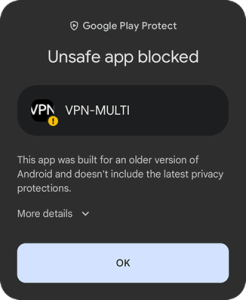
You should now see on screen a similar looking screenshot as below. Click/tap on the “Install anyway” text and the installation should proceed and complete
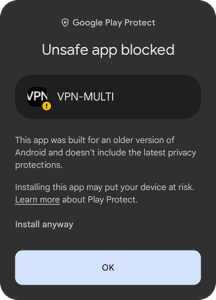
NOTE Screenshots show VPN-MULTI app. name but this is the same for both VPN-BASIC and VPN-MULTI apps.
